Evidence boundary
This page separates confirmed official notes, preview observations, and player reports. The final-build mission name, exact inputs, timing windows, prerequisite, reward, and any universal stuck fix remain unverified.
Quick Answer
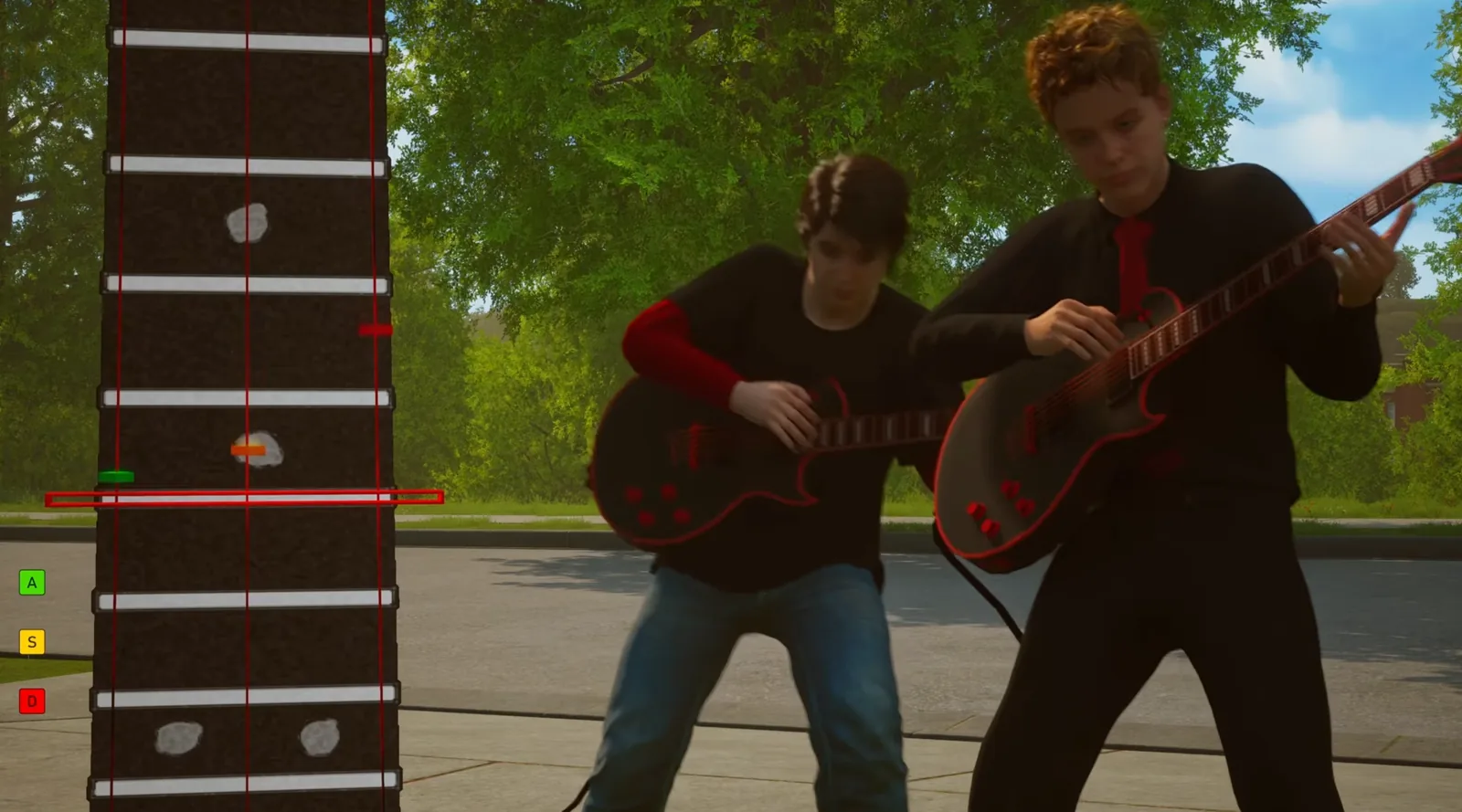
If the guitar segment is blocking your Agefield High mission, update the game through Steam before trying it again. The developer confirmed an update on 13 August 2026 that made the music minigames easier to pass. Beyond that, the reliable evidence is limited: players report difficult, sometimes offbeat-feeling timing, but we could not independently verify a fixed key pattern, a controller advantage, a no-miss requirement, or a skip method.
Quick Answer: Install the latest Steam update, retry the music prompt, and focus on the prompt rather than assuming it follows the song’s beat. A community thread reports that two missed notes could still pass while three failed for one player, but that threshold is not official and may not apply to every attempt.
Confirmed
The official update is the strongest practical starting point. Refugium Games said its 13 August post made music minigames easier to pass and fixed unspecified smaller issues. It did not name a build number, identify a particular guitar mission, list input changes, or promise that every progress block had been repaired. Check Steam’s download queue, let any pending update finish, and then launch the game normally.
The official source does not name a particular Guitar mission, its start point, prerequisite, reward, or input sequence. A Steam discussion has more than one player saying they were stuck at a main-mission guitar performance. Another discussion calls the task “Embarrassing Attempts,” but that spelling and title come from players—not an official quest list—so this guide does not treat it as the formal mission name.
Observed in a preview
An IGN preview separately described the game’s Music activity as Guitar Hero-like and found the inputs felt generally offbeat during a pre-release build. It also saw a similar rhythm activity in a later preview mission. That is useful context for the reports, but it is not proof that the release build has the same timing behavior or that a timing bug exists. See the related Music class guide for the evidence boundary.
A safe retry sequence
- Install pending Steam updates. Restart Steam if needed and let the 13 August or later update download before retrying. The official post supports this step; it does not reveal a version number to compare.
- Restart the segment cleanly through the game’s normal retry flow. We could not independently verify a specific restart/checkpoint command, so do not delete saves or use third-party tools to force progress.
- Read the on-screen rhythm prompt, not just the music. Community reports say the notes did not always feel aligned to the audible beat. Treat this as a timing exercise with visual prompts rather than evidence of a guaranteed “offbeat” bug.
- Keep a simple record of what fails. Note whether the attempt fails immediately, after a count of misses, or after completing the visible sequence. This makes a useful bug report if the block persists.
- Avoid changing graphics, V-Sync, frame limit, or input settings solely for this mission. No reliable source reviewed for this guide establishes that any of those changes alter guitar judgment. A change might help an individual PC, but it is not a verified fix.
Community reports about misses and timing
One community thread contains a helpful but limited report: a player said two missed notes still passed and three missed notes failed. That is a community-reported observation, not an official score rule. It may refer to one sequence, one build, or an imprecise count. Do not assume a zero-miss clear is mandatory, but do not plan around a two-miss allowance either.
The same discussion says the notes can feel late or early against the music. A separate pre-release preview observed a similar impression. Together, those sources support careful wording: some players may find the visual timing less intuitive than the soundtrack. They do not prove an input-lag defect, controller-specific behavior, or a universal timing offset.
If it still doesn’t work
First, verify the game files in Steam: Library → Agefield High: Rock the School → Properties → Installed Files → Verify integrity of game files. Valve describes this as a way to restore missing or changed game files. It is a low-risk repair step and does not require deleting a save.
If the segment still cannot be cleared after the update and verification, avoid unsupported “skip” trainers or save edits. Take a screenshot or short recording of the prompt, record the time of the attempt and the exact behavior, then use the developer’s Steam community bug-report route. Include your hardware, controller/keyboard used, and whether the game says fail or simply does not advance. That evidence is more useful than guessing at undocumented settings.
Known bug or intended mechanic?
The developer confirmed that music minigames were made easier in an update, which acknowledges a difficulty adjustment but does not confirm a guitar-mission bug. Player reports establish that some people were stuck and that timing felt unusual. We found no official confirmation of a quest-script bug, a keyboard/controller difference, a frame-rate cause, or a fixed miss limit.
Exact results may change after a game update. If your prompt looks different from the reports, treat the community observations as context rather than instructions.
Sources
- Refugium Games: “Update Is Out!” on Steam — official 13 August update.
- Steam Community: “Quest Embarrassing Attempt Needs to be Changed” — player timing and miss-count reports.
- Steam Community: “Stuck on guitar playing in main mission” — player progress-block reports.
- IGN preview — pre-release context for the rhythm mini-game.
For more school-system context, see the Agefield High classes guide, the Music class guide, the Missions hub, and the Seth mission stuck status page. The missing final-build capture targets are documented in the site’s manual screenshot queue.